



Documentation contents
Inbox and e-mail
Knowledge base
Files
Analytics
Account and billing
OAuth for AI app builders
Updated
This page is for people who build an AI app or an MCP client. If you only connect your app, read Connect an AI agent over MCP.
The HRC pagalba MCP server uses OAuth 2.1 with dynamic client registration (RFC 7591) and PKCE. There is no client secret (token_endpoint_auth_method: none).
Discovery
A call without a token gets 401 with a link to the resource metadata:
curl -s -i https://mcp.hrc.lt/mcp -H "Content-Type: application/json" \
  -d '{"jsonrpc":"2.0","id":1,"method":"ping"}' | grep -i www-authenticate
# WWW-Authenticate: Bearer resource_metadata=
#   "https://mcp.hrc.lt/.well-known/oauth-protected-resource/mcp"

curl -s https://mcp.hrc.lt/.well-known/oauth-protected-resource/mcp
curl -s https://mcp.hrc.lt/.well-known/oauth-authorization-server
Client registration
1 to 20 redirect_uris: https, http only on localhost, 127.0.0.1 or [::1], or the app's own scheme (for example cursor://...).
curl -s https://mcp.hrc.lt/oauth/register \
  -H "Content-Type: application/json" \
  -d '{
    "client_name": "My AI app",
    "redirect_uris": ["https://app.example.com/oauth/callback"]
  }'
# 201 {"client_id":"...","token_endpoint_auth_method":"none",
#   "grant_types":["authorization_code","refresh_token"], ...}
Authorization with PKCE
Send the user to the authorization address with code_challenge_method=S256:
https://mcp.hrc.lt/oauth/authorize
  ?response_type=code
  &client_id=CLIENT_ID
  &redirect_uri=https%3A%2F%2Fapp.example.com%2Foauth%2Fcallback
  &code_challenge=BASE64URL_SHA256_OF_VERIFIER
  &code_challenge_method=S256
  &state=RANDOM_STATE
  &resource=https%3A%2F%2Fmcp.hrc.lt%2Fmcp
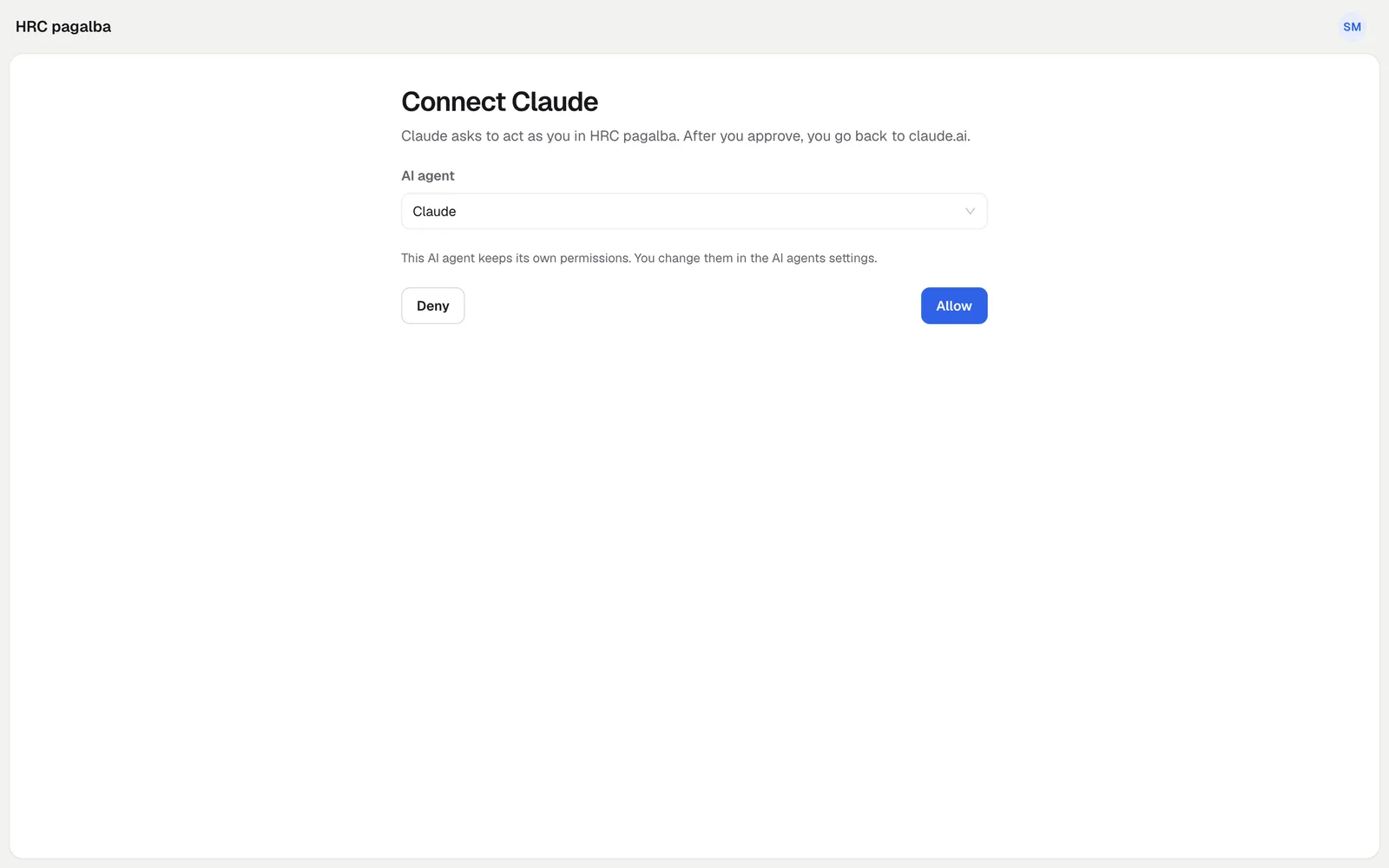
The user signs in to https://app.hrc.lt and on the consent screen picks an existing AI agent or creates a new one (with the "Daily" preset by default), then presses "Allow". The request is valid for 10 minutes, the code for 5 minutes and only once.
Tokens
The access token (hrc_oat_...) is valid for 1 hour; then refresh it with the refresh_token. After a refresh the old access token stops working at once.
curl -s https://mcp.hrc.lt/oauth/token \
  -d grant_type=authorization_code \
  -d code=CODE \
  -d client_id=CLIENT_ID \
  -d code_verifier=VERIFIER \
  -d redirect_uri=https://app.example.com/oauth/callback
# {"access_token":"hrc_oat_...","token_type":"Bearer","expires_in":3600,
#   "refresh_token":"...","scope":"hrc"}

curl -s https://mcp.hrc.lt/oauth/token \
  -d grant_type=refresh_token \
  -d refresh_token=REFRESH_TOKEN \
  -d client_id=CLIENT_ID
An MCP call
curl -s https://mcp.hrc.lt/mcp \
  -H "Authorization: Bearer $TOKEN" \
  -H "Content-Type: application/json" \
  -d '{"jsonrpc":"2.0","id":1,"method":"tools/call",
    "params":{"name":"whoami","arguments":{}}}'
Errors
- Registration:
invalid_redirect_uri,invalid_client_metadata. - Token:
invalid_request,invalid_grant,invalid_client,unsupported_grant_type,invalid_target. - An unknown
client_idor an unregisteredredirect_uriat authorization shows an error page, with no redirect.
Did not find the answer? Write to us