



Documentation contents
Inbox and e-mail
Knowledge base
Files
Analytics
Account and billing
Connect an AI agent over MCP
Updated
The HRC pagalba MCP server is at https://mcp.hrc.lt/mcp (Streamable HTTP). Paste it into your AI app's settings and sign in to HRC pagalba. The exact steps with copy buttons are also in the app: Settings, AI agents, "Connect an AI app".
Important. Before you connect, the company owner turns on AI agent access in Settings, AI agents.
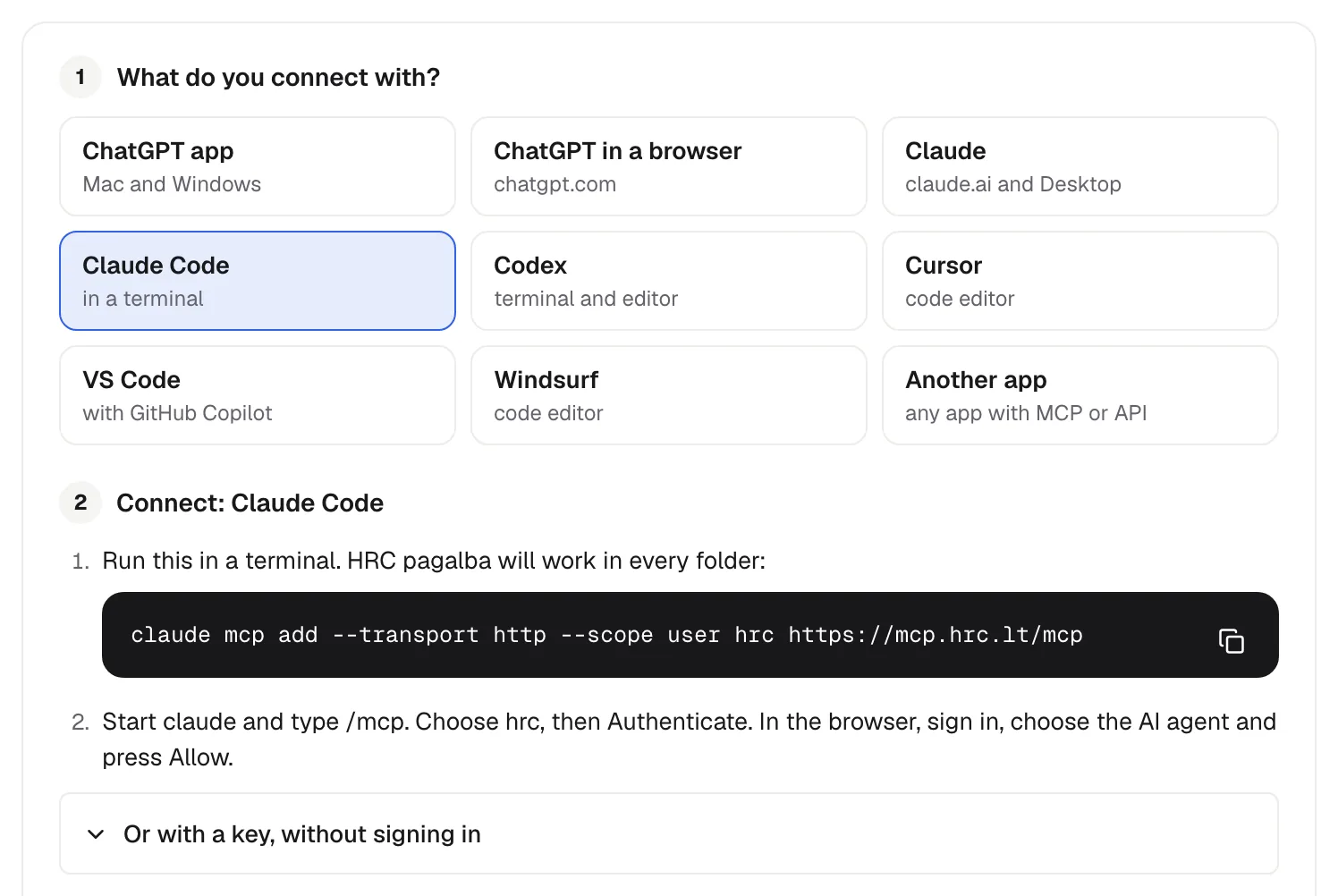
ChatGPT app (and the Codex app on Mac or Windows)
- In the app open Settings, Plugins. At the top right press Add, then Add MCP server.
- In the Connect to a custom MCP form: Name
hrc, Type Streamable HTTP, URLhttps://mcp.hrc.lt/mcp. - Leave Bearer token env var, Headers and Headers from environment variables empty and press Save. Do not put a key in Bearer token env var: it takes the name of a variable.
- In the MCPs tab, on the hrc row, press Authenticate.
- In the browser, sign in to HRC pagalba, choose the company and the AI agent, then press "Allow".
- The browser shows a short message from the app, "Authentication complete". Close that window and go back to the app.
In an older version of the app the same form opens from Settings, MCP servers, Add server.
ChatGPT in a browser
- Open chatgpt.com/plugins, press +, then Add custom MCP server.
- Server URL
https://mcp.hrc.lt/mcp, Authentication OAuth, then Create. - Sign in to HRC pagalba and press "Allow". A key does not work here.
- You need a Business, Enterprise or Edu plan.
Claude (claude.ai and Claude Desktop)
- Customize (or Settings), Connectors, + Add, Add custom connector.
- Name HRC pagalba, URL
https://mcp.hrc.lt/mcp, Continue. - Authentication Sign in now, Add, then sign in and press "Allow".
Claude Code
claude mcp add --transport http --scope user hrc https://mcp.hrc.lt/mcp
# then start claude, type /mcp, choose hrc and Authenticate
Codex in a terminal and code editor
codex mcp add hrc --url https://mcp.hrc.lt/mcp
codex mcp login hrc
Cursor
In ~/.cursor/mcp.json, then open Customize in the Cursor sidebar (in an older version, Cursor Settings, MCP) and sign in next to hrc:
{ "mcpServers": { "hrc": { "url": "https://mcp.hrc.lt/mcp" } } }VS Code (GitHub Copilot)
Command Palette, MCP: Add Server, HTTP, the address https://mcp.hrc.lt/mcp, name hrc. Press Start; when VS Code asks, press Allow and sign in. You need VS Code 1.101 or newer.
Windsurf
In ~/.codeium/windsurf/mcp_config.json, save and sign in when Windsurf asks:
{ "mcpServers": { "hrc": { "serverUrl": "https://mcp.hrc.lt/mcp" } } }Another app
Type Streamable HTTP (http), the address https://mcp.hrc.lt/mcp, then sign in with OAuth. For an app that only runs local servers:
npx -y mcp-remote https://mcp.hrc.lt/mcp --transport http-onlyCheck it
Ask your AI: "Call the HRC pagalba tool whoami and tell me which company you are connected to." The answer names the company, your permissions and your tools.
What the AI agent sees
- Tools: only those its areas allow, and always
whoami. For exampleconversation_list,prepared_reply_replace,task_queue,task_take,kb_article_update,contact_set_profile,changelog_entry_create. - News: with the News permission an owner's AI agent writes a chat widget news entry as a draft (
changelog_entry_create) and publishes it (changelog_entry_set_status). The AI help button on a chat widget's News tab gives a ready prompt. - Files on tasks: with the Tasks permission (write) the AI agent adds files to a task and they appear in it at once. A small file up to 10 MB goes in the call itself (
task_file_add). A file with an https link is downloaded by HRC pagalba (task_file_add_from_url,task_file_upload_status); in ChatGPT this attaches a file you uploaded to the chat. An AI agent that runs commands (Claude Code, Codex, Cursor) uploads a file of any size with curl (task_file_upload_start,task_file_upload_sign_parts,task_file_upload_complete,task_file_upload_abort).task_file_listlists a task's files with a 5 minute download link. An owner's AI agent removes a file withtask_file_remove. The company's file size limit, storage and blocked file types apply as for people. - Resources: open tasks (
hrc://task/<number>), knowledge base articles and the KB Markdown guide. - Prompt:
build_knowledge_baseto build a knowledge base (with write access to knowledge bases).
Every call goes into the action log.
An app that cannot sign in
Send the header with a key you create in Settings, AI agents:
Authorization: Bearer hrc_live_...The same key works for the REST API.
Did not find the answer? Write to us